Background

The network product management system involves many query functions with similar features and UI.
We aim to modularize these functions to reduce development costs for both frontend and backend.


Solution 1: Frontend Maintains Templates

Templates are maintained within the frontend codebase.
Each new feature still requires frontend–backend joint development before deployment.

Pros

  • High flexibility
  • Supports complex interactions and custom displays

Cons

  • Each new feature requires both frontend and backend effort
  • Estimated frontend workload: ~15min per configuration

Example — Custom Query

example.png

1
2
3
4
5
6
7
8
9
10
11
12
13
14
15
16
17
18
19
20
21
// /components/config.tsx
import {
FormComp as CustomCmdFormComp,
ResultComp as CustomCmdResultComp,
} from './CustomCmd';

const configTypes = [
// ...other query tools
{
value: 'value',
label: 'label',
FormComp: FormComp,
ResultComp: ResultComp,
onSubmit: async (formData: any, axiosInstance: any) => {
return services.geResult({
params: formData,
axiosInstance,
});
},
},
];
1
2
3
4
5
6
7
8
9
10
11
12
13
14
15
16
17
18
19
20
21
22
23
24
25
26
27
28
29
30
31
32
33
34
35
36
37
38
39
40
41
// /components/Comp.tsx
export function FormComp(props: FormCompProps) {
return (
<>
<Form.Item
label="My label"
name="my_name"
required
rules={[{ required: true }]}
>
<Input
allowClear
placeholder="请输入"
/>
</Form.Item>
<Form.Item
label="My label"
required
name="my_name"
rules={[{ required: true }]}
>
<Input.TextArea placeholder="请输入" />
</Form.Item>
</>
);
}

export function ResultComp({
formData,
result,
}: ResultCompProps<GetResultResponse>) {
return (
<Descriptions title="Result">
{items.map((item, index) => (
<Descriptions.Item label={item.label} span={item.span} key={index}>
{item.children}
</Descriptions.Item>
))}
</Descriptions>
);
}

Solution 2: Backend Maintains Templates

Templates are stored and managed on the backend.
The frontend fetches the configuration and renders forms dynamically.
(Note: requires a new route since the rendering logic differs from the existing query tool.)

Pros

  • Only one-time frontend development; future updates require no frontend effort

Cons

  • Lower flexibility
  • Estimated initial frontend workload: ~4 days
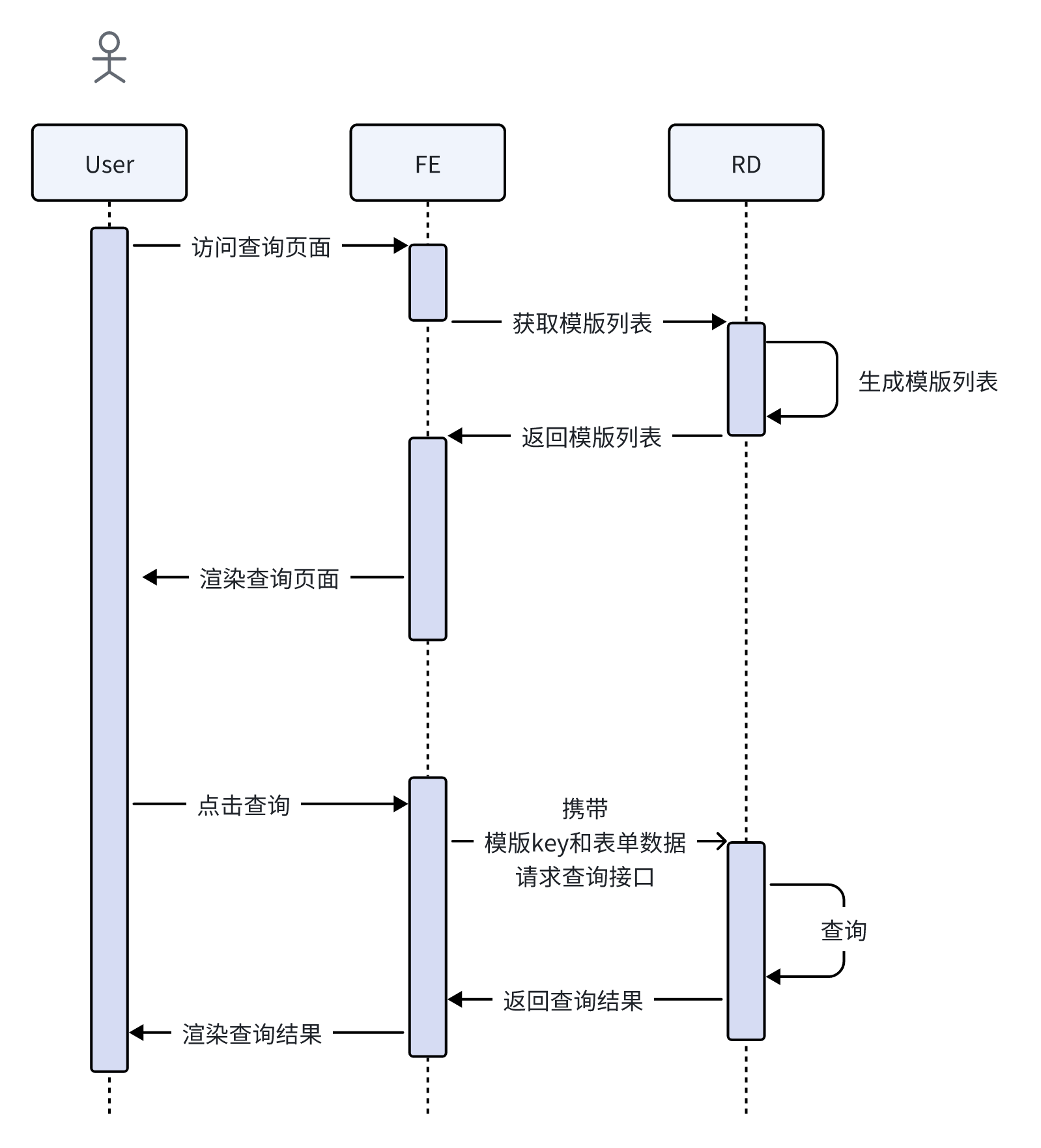
process.png

Template Definition

JSON Schema defines JSON data structures — types, formats, and constraints — similar to XML Schema for XML.
It can validate whether a JSON object matches the expected schema.

This approach uses JSON Schema to describe templates for better scalability and compatibility with open-source libraries like Formily.

TODO: Should query results also be configurable via template?

Example — Custom Query

example.png

1
2
3
4
5
6
7
8
9
10
11
12
13
14
15
16
17
18
19
20
21
22
23
24
25
26
27
28
29
30
31
32
33
34
35
36
37
38
39
40
41
42
43
const list = [
// ...other schemas
{
id: 'customCmd',
type: 'object',
properties: {
device_ip: {
type: 'string',
title: '标题',
required: true,
'x-decorator': 'FormItem',
'x-component': 'Input',
'x-component-props': {
allowClear: true,
placeholder: '请输入',
},
},
custom_cmd: {
type: 'string',
title: '标题',
required: true,
'x-decorator': 'FormItem',
'x-component': 'Input.TextArea',
'x-component-props': {
placeholder: '请输入',
},
},
select_example: {
type: 'string',
title: '选择框',
'x-decorator': 'FormItem',
'x-component': 'Select',
enum: [
{ label: '选项1', value: 1 },
{ label: '选项2', value: 2 },
],
'x-component-props': {
placeholder: '请选择',
},
},
},
},
];

Issues Encountered

Formily does not re-render fields with the same name when switching templates.
Reference: https://github.com/alibaba/formily/issues/399

Attempted solutions:

  • Adding a key to FormProvider or SchemaField (ineffective)
  • FormProvider key caused internal state loss (validation failed to sync)
1
2
3
4
5
6
7
8
9
10
11
12
13
14
15
16
17
18
19
20
21
22
23
24
25
<FormProvider form={form}>
<SchemaField
schema={{
type: 'object',
properties: {
layout: {
type: 'void',
'x-component': 'FormLayout',
'x-component-props': formLayoutProps,
properties: formatProperties(currentTemplate),
},
},
}}
/>
<FormButtonGroup>
<Reset disabled={!templateId}>重置</Reset>
<Submit
onSubmit={onSubmit}
disabled={!templateId}
loading={loading}
>
提交
</Submit>
</FormButtonGroup>
</FormProvider>

Final fix:
Prefix each field name with the template ID using lodash.mapKeys.

1
2
3
4
5
6
7
8
9
10
11
12
// FIXME: Formily doesn't re-render identical field names across templates
function formatProperties(template?: Template): JSONSchema {
try {
const inputProperties = parseJSON(template?.inputProperties, {});
const newInputProperties = mapKeys(inputProperties, (value, key) => {
return template?.id + '.' + key;
});
return newInputProperties as JSONSchema;
} catch (e) {
return {} as JSONSchema;
}
}

References