背景:在调研 @formatjs/cli 使用(使用 @formatjs/cli 进行国际化文案自动提取 )过程中,发现有以下需求@formatjs/cli 无法满足:
- id 需要一定的语义化;
defaultMessage和Id不能直接hash转换;- 需要直接从中文转换为
formatMessage;- 需要显式注入ID(个人觉得编译时注入还是反直觉了一点);
另外也是希望借助这个机会好好学一下AST相关知识,所以决定自己写一个AST转换工具。
*注意:工具无法满足脱离中文文案和文件名的语义化ID需求。
实现效果
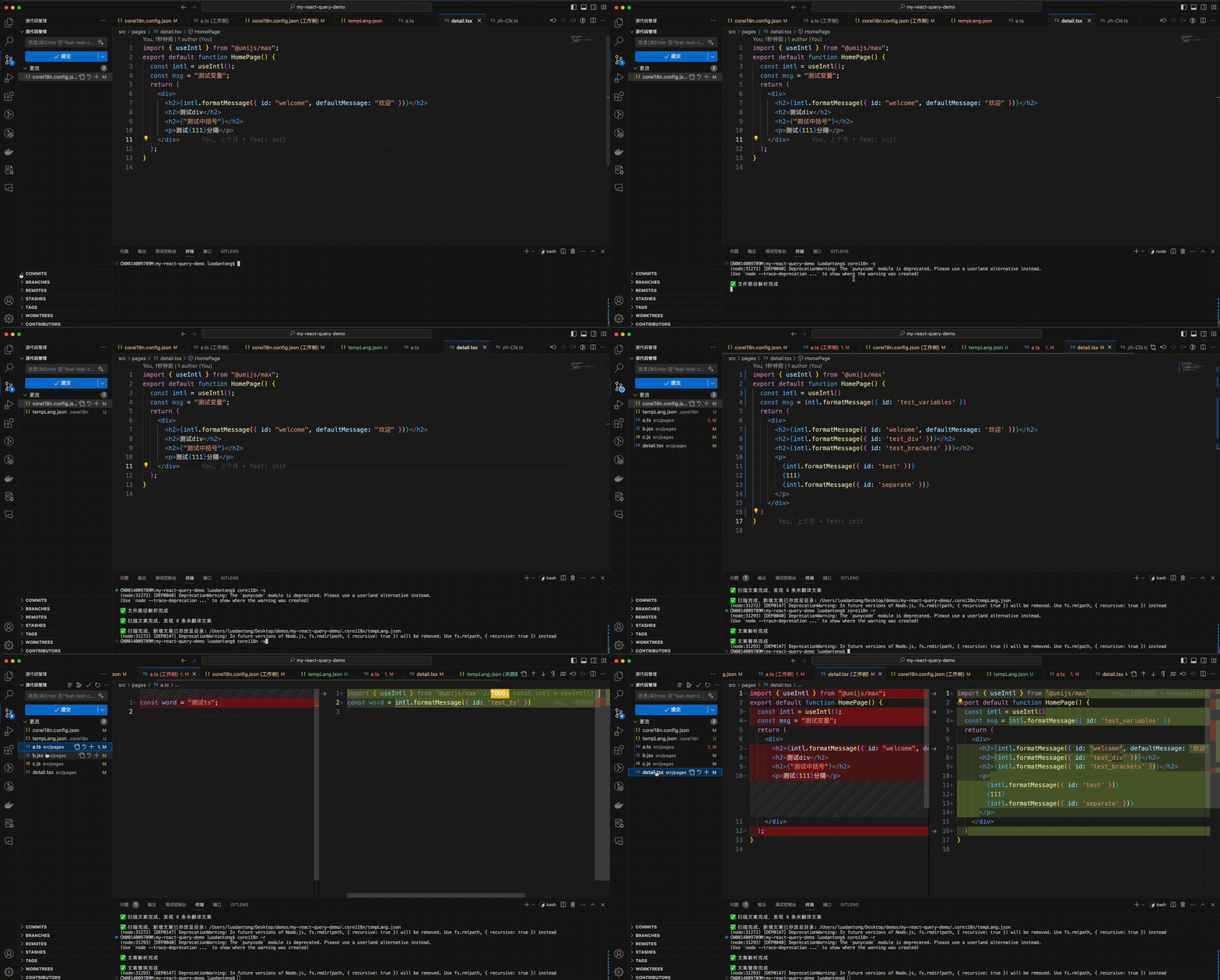
如何使用
https://www.npmjs.com/package/core-i18n-cli?activeTab=readme
安装
1 | npm i -g core-i18n-cli |
CLI 参数
corei18n -i, --init
初始化项目,生成配置文件 corei18n.config.json,方便根据你的项目需求进行配置。
默认配置包括以下参数:
1 | export type ProjectConfig = { |
例子:
1 | { |
corei18n -s, --scan
一键扫描指定文件夹下的所有中文文案,新增文案会存放至tempLangFile
corei18n -r, --replace
一键替换指定文件夹下的所有中文文案
实现过程
关于AST
AST explorer:https://astexplorer.net/
AST(抽象语法树)是源代码的抽象表示形式,它捕捉了代码的结构,而不关心具体的字符格式。AST是在编译器设计和解析源代码时常见的一种数据结构。
在编程语言的编译过程中,源代码首先被解析器解析成一种称为AST的中间表示。AST反映了代码的语法结构,每个节点代表代码中的一个结构元素,如表达式、语句、函数、变量等。这种树状结构使得程序的结构和语法可以被更容易地分析和处理。
操作流程

scan 阶段
- 根据
path和ignoreFile得到所有目标文件 - 对于每个文件,读取文件内容,将代码转换为AST
- 遍历AST节点,若是
StringLiteral或者JSXText,判断是否符合要求(包含中文且不属于default Message),如果是则记录下来 - 过滤得到所有新增文案并生成id
- 将新增文案导出到目标文件
replace 阶段
- 根据
path和ignoreFile得到所有目标文件 - 获取所有文案对;
- 对于每个文件,读取文件内容,将代码转换为AST
- 遍历AST节点,若是
StringLiteral或者JSXText,判断是否符合要求(包含中文且不属于default Message),如果是则替换当前AST节点; - 使用
prettier进行格式化; - 根据AST生成代码写入文件路径;
依赖的npm包
babel
- @babel/core:负责整个编译过程的调度和控制;
- @babel/parser:用于将 JavaScript 源代码解析成抽象语法树(AST);
- @babel/traverse:用于遍历和修改 AST 的工具;
- @babel/types:用于创建、检查和修改 AST 节点
cli相关
- commander:解析命令行参数和生成帮助信息;
- inquirer:交互式命令行工具,用于收集用户输入;
- glob:匹配文件路径
- lodash:工具库
- prettier:代码格式化
遇到的问题
解决babel/generater生成中文等特殊字符被转义为Unicode编码
1 | const newCode = generator.default( |
Error [ERR_REQUIRE_ESM]: require() of ES Module
1 | // tsconfig |
1 | // package.json |
Error [ERR_MODULE_NOT_FOUND]: Cannot find module
https://github.com/microsoft/TypeScript/issues/16577
原因:tsc输出时不会添加文件拓展名,nodejs运行时不会自动匹配文件拓展名
尝试在文件首行添加 –experimental-specifier-resolution=node 无效
使用tsc-alias为导出文件添加js后缀后解决:
1 | npm install --save-dev tsc-alias |
1 | // tsconfig.json |
1 | "scripts": { |