背景:我们的项目有国际化文案的需求,接入的国际化方案为umi提供的react-intl。(详见国际化)项目结构大致如下:
1
2
3
4
5
6
7
| src
+ locales
+ zh-CN.ts
+ en-US.ts
pages
a.tsx
b.tsx
|
每次有新的页面开发,都涉及到不少手动提取文案key的工作,现希望能把这部分的功能自动化,提高开发效率。
官方文档:https://formatjs.io/docs/tooling/cli
FormatJS 是一个用于国际化的 JavaScript 库的模块化集合,专注于格式化数字、日期和字符串以向人们显示。它包括一组基于 JavaScript Intl 内置函数和行业范围的 i18n 标准构建的核心库,以及一组通用模板和组件库的集成。@formatjs/cli是其官方提供的cli工具。
实现效果
1
2
3
4
5
6
7
8
9
10
11
12
13
14
15
16
17
18
19
20
21
22
23
24
25
26
27
28
29
30
| // src/pages/a.tsx
import { useIntl, SelectLang } from "@umijs/max";
import React from "react";
export default function HomePage() {
const intl = useIntl();
const name = "ben";
return (
<div>
<h2>
{intl.formatMessage({
defaultMessage: "你好",
})}
</h2>
<p>
{intl.formatMessage({
id: "existedId",
})}
</p>
<p>
{intl.formatMessage(
{
defaultMessage: "你好 {name}",
},
{ name }
)}
</p>
</div>
);
}
|
运行 npm run i18n 后
1
2
3
4
5
6
| // src/locales/zh-temp.json
{
"5ASYdK": "你好 {name}",
"UjIYG8": "你好"
}
|
使用流程
- 安装
1
| yarn add --dev @formatjs/cli babel-plugin-formatjs
|
- 在
package.json 添加
1
2
3
4
5
6
| "scripts": {
"i18n:tsc": "tsc src/utils/i18n.ts --skipLibCheck --target es2015 -module commonjs --moduleResolution node --outDir i18n-temp",
"i18n:extract": "formatjs extract "src/**/*.{js,jsx,ts,tsx}" --ignore "src/**/*.d.{ts}" --out-file i18n-temp/locales/temp.json --id-interpolation-pattern [sha512:contenthash:base64:6]",
"i18n:complie": "formatjs compile i18n-temp/locales/temp.json --format i18n-temp/utils/i18n.js --out-file src/locales/zh-temp.json",
"i18n": "npm run i18n:tsc && npm run i18n:extract && npm run i18n:complie && rm -rf i18n-temp"
}
|
全部参数:https://formatjs.io/docs/tooling/cli#extraction-and-compilation-with-a-single-script
--ignore [files]:忽略某些文件,比如d.ts
--out-file:输出文件的path
--id-interpolation-pattern:哈希id生成规则,默认为[sha512:contenthash:base64:6]
- 添加 utils/i18n.ts 用于过滤已存在的msg Id
1
2
3
4
5
6
7
8
9
10
11
12
13
14
15
16
| // src/utils/i18n.ts
import _locale from "../locales/zh-CN";
const locale: Record<string, string> = _locale;
// https://github.com/formatjs/formatjs/blob/main/packages/cli-lib/src/formatters/default.ts
export function compile(msgs: Record<string, { defaultMessage?: string }>) {
const results: Record<string, string> = {};
for (const k in msgs) {
if (msgs[k].defaultMessage && !locale[k]) {
results[k] = msgs[k].defaultMessage!;
}
}
return results;
}
|
- 添加 Babel 插件
1
2
3
4
5
6
7
8
9
10
| // .umirc.ts
extraBabelPlugins: [
[
"formatjs",
{
idInterpolationPattern: "[sha512:contenthash:base64:6]",
removeDefaultMessage: true, // 编译后删除 DefaultMessage
},
],
]
|
完成。
现在运行npm run i18n ,会发现新增文案已经被提取到src/locales/zh-temp.json文件中,在编译过程中,babel插件会自动注入msgId。
1
2
3
4
5
| {
"LCPVEl": "测试文案1",
"PRo5ml": "测试文案2",
"f1d3UT": "测试文案3"
}
|
*最好在.gitignore中加一下zh-temp.json避免上传到远程仓库。
显式注入Message Id
如果需要显式注入ID,可以使用cli提供的eslint插件开启enforce-id
https://formatjs.io/docs/tooling/linter
1
| yarn add -D eslint-plugin-formatjs
|
1
2
3
4
5
6
7
8
9
10
11
| // .eslintrc.js
plugins: ["formatjs"],
rules: {
"formatjs/enforce-id": [
1,
{
idInterpolationPattern: "[sha512:contenthash:base64:6]"
},
],
},
|
在报错信息中选择fix all
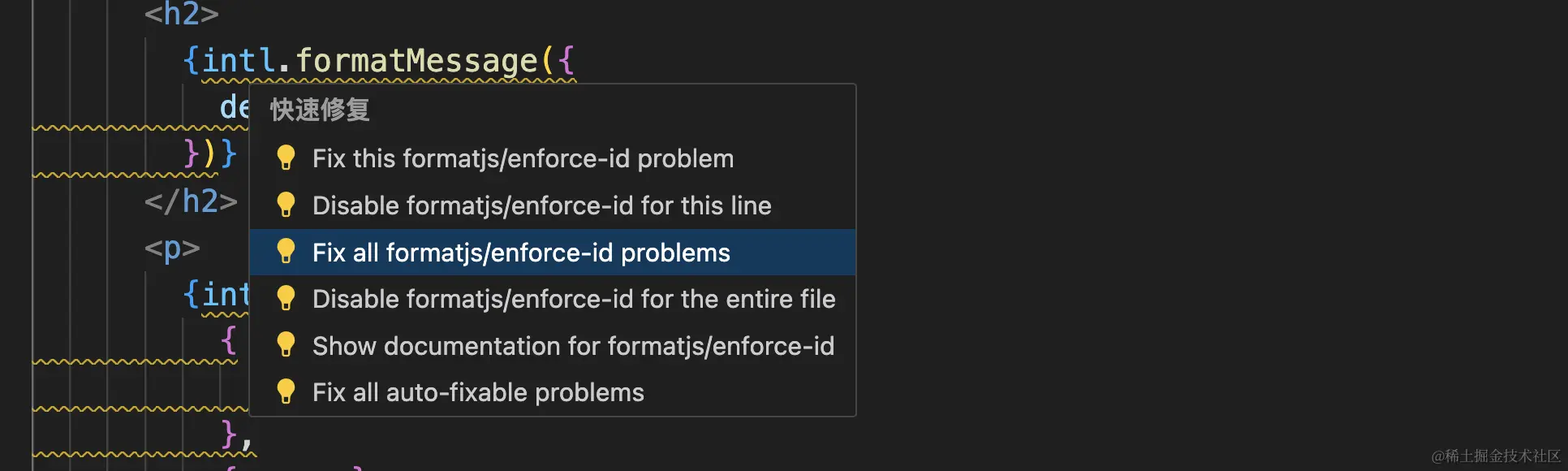
需要注意:1. 必须存在defaultMessage;2. defaultMessage与id一一对应,所以一般情况不太建议开启。
*一些遇到的问题
id为变量时报错
https://github.com/formatjs/formatjs/issues/2910#issuecomment-1465464097
看起来插件没办法处理id是变量的情况,一个hack的处理办法是把defaultMessage赋值为空数组
1
| intl.formatMessage({ id: keyMap[key], defaultMessage:[] })
|
Message ID不会自动注入
相关issue:https://github.com/formatjs/formatjs/issues/1907
cli通过defaultmessage生成唯一的hashID,defaultmessage变化时(e.g.拼写错误)cli会将他定义为新的待翻译文本
Yarn add 报错:Invariant Violation: expected workspace package to exist for “ts-jest”
需要降级yarn到18,原因不明。。https://github.com/yarnpkg/yarn/issues/7807#issuecomment-588632848
1
| yarn policies set-version 1.18.0 && yarn workspace core-vpc-app add --dev @formatjs/cli babel-plugin-formatjs
|
cli只会识别intl.formatMessage 或 FormattedMessage,如果文案是中文不会被自动提取转换
Author:
Dantong Luo
Permalink:
https://dantongluo.vercel.app/2024/01/17/extract-i18n-with-formatjs-cli/
License:
Copyright (c) 2019 CC-BY-NC-4.0 LICENSE
Slogan:
Do you believe in DESTINY?